Chapter 2 Database Management
The database is the core of an Odoo system. Customers, products, orders, inventory, invoices, attachments, and system configuration are ultimately stored in the database and filestore.
Customers implementing Odoo by themselves do not need to know database commands, but they must understand the test database, production database, backups, and restore operations. Otherwise, a wrong operation can be difficult to recover from.
What Is An Odoo Database
An Odoo database can be understood as an independent business environment or accounting set.
A database usually contains:
- Company information;
- Users and permissions;
- Customers, vendors, and products;
- Sales, purchase, inventory, and accounting documents;
- Emails, attachments, and images;
- Installed modules and system configuration.
Data does not automatically flow between databases. Orders in the test database do not enter production, and customers in production do not automatically appear in the test database.
Test Database And Production Database
During an Odoo implementation, at least distinguish the test database from the production database.
| Database | Usage | Notes |
|---|---|---|
| Test database | Test processes, configuration, imports, and user training | Can be cleaned and restarted repeatedly |
| Production database | Records real business data | Do not delete, import, or test casually |
| Backup restore database | Temporarily restore backups to inspect data | Do not let employees use it as production by mistake |
The test database is for safe trial and error. The production database must be handled carefully. Do not test deletion, mass import, module uninstall, or permission experiments in production.
Database Manager Entry
For self-hosted Odoo, the database manager is usually available at:
http://your-domain/web/database/manager
The database manager usually supports:
- Creating databases;
- Backing up databases;
- Restoring databases;
- Duplicating databases;
- Deleting databases.
If this address returns 404 or cannot be accessed in production, the administrator may have disabled the database manager. This is a common security practice in production environments.
How To Read The Database Manager
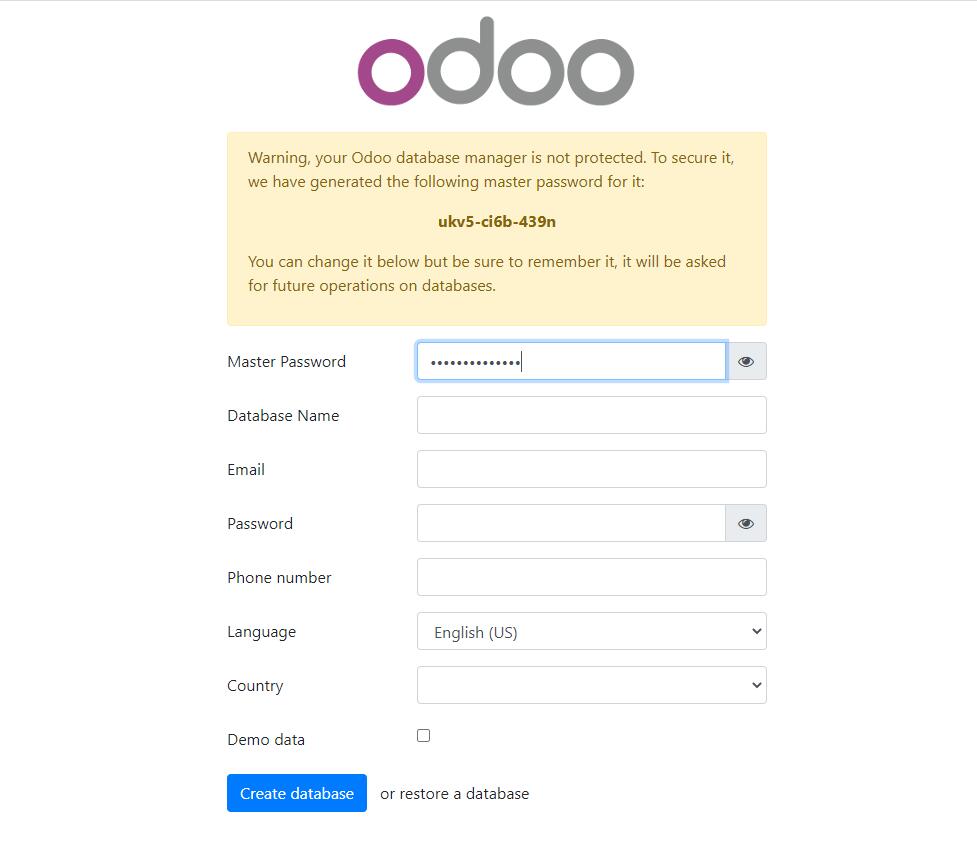
When you open the database manager, do not click buttons casually. Every operation on this page can affect the entire system. The following screenshots show a traditional self-hosted Odoo database management flow. Interfaces differ by version and deployment method, but the core actions are similar.
When accessing a newly installed Odoo for the first time, the system may guide you to create a database.
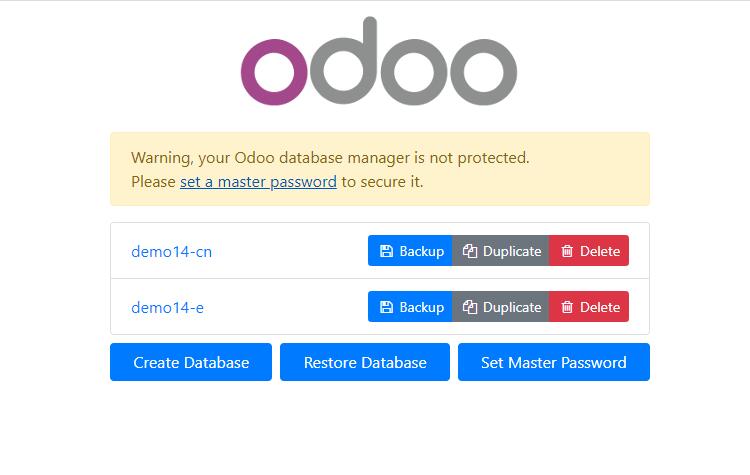
The database manager usually shows actions such as backup, duplicate, and delete.
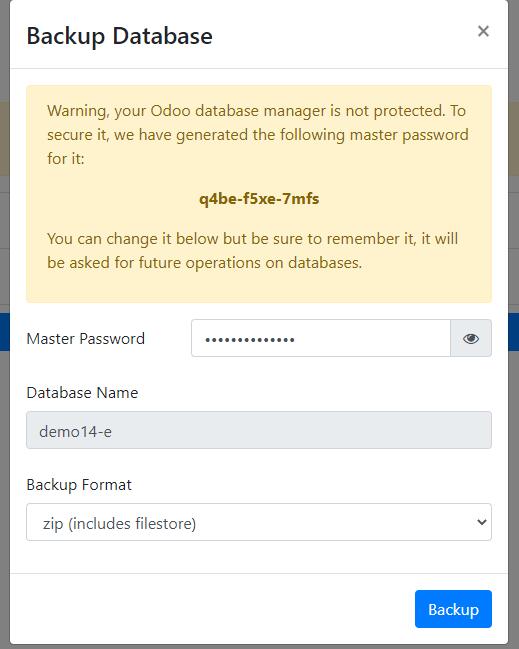
Common backup formats include zip and dump. A zip backup usually includes attachments, while a dump focuses more on the database itself.
If a third-party automatic backup module is used, it usually provides a backup configuration menu.
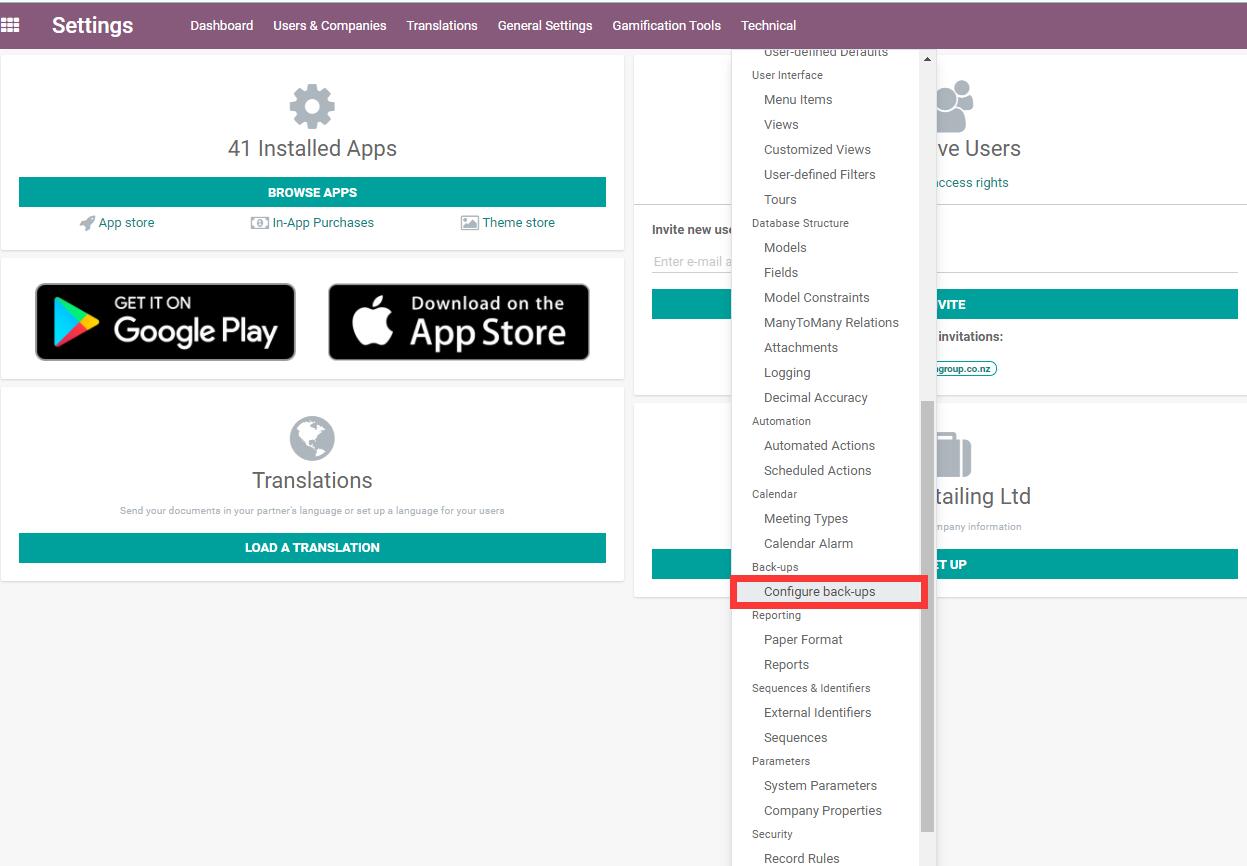
Backup configuration usually includes database host, database name, port, backup format, backup directory, and automatic cleanup rules.
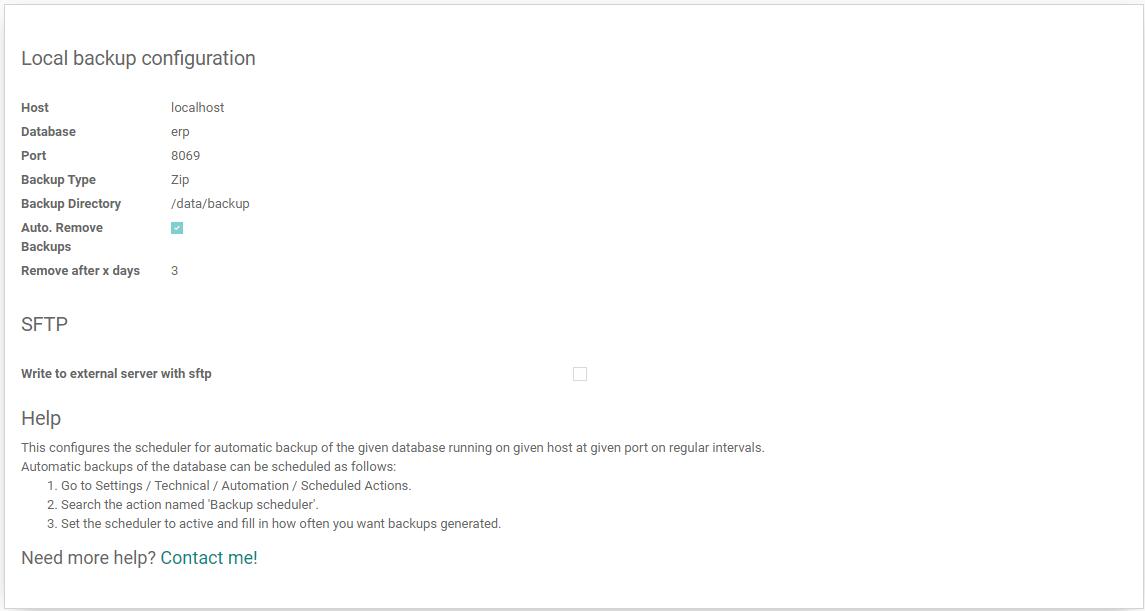
Automatic backup still depends on scheduled actions, so after configuration, check whether the scheduled action is enabled and running.
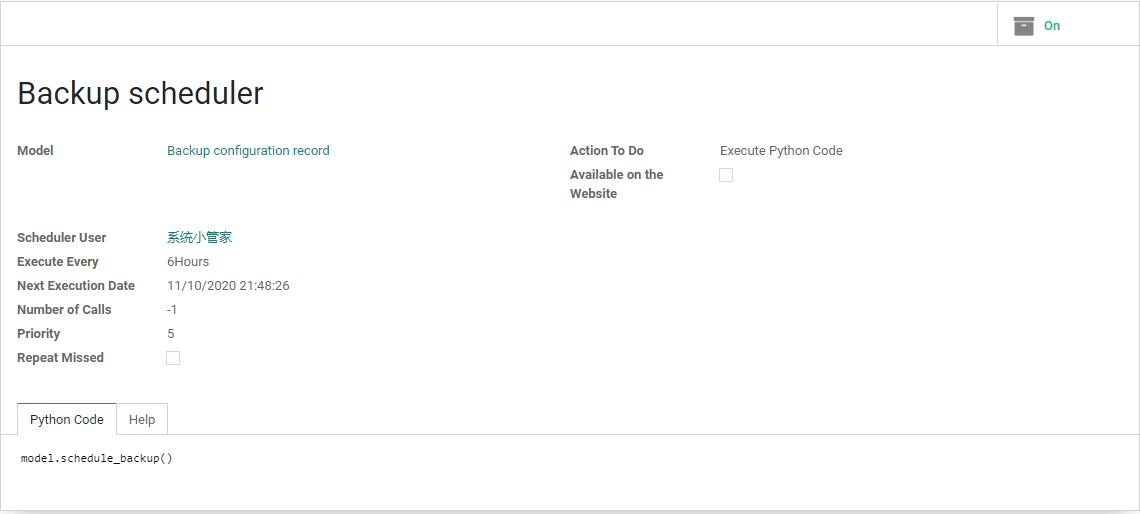
These screenshots are suitable for self-hosted or Community Edition operation scenarios. Odoo Online and Odoo.sh use different backup methods and should follow their platform capabilities.
Master Password
The database manager usually requires a master password. This is not the Odoo user password. It is used to create, back up, restore, duplicate, and delete databases.
The master password is highly sensitive.
Recommendations:
- Keep it only with the system administrator or project owner;
- Do not send it in WeChat groups, emails, or public documents;
- Update it during employee handover;
- Do not use the same password as the admin user;
- Do not let normal employees know it in production.
If the master password is leaked, someone may be able to download a database backup or delete a database. The risk is very high.
Create A Database
Creating a database is usually used for:
- New project initialization;
- Building a test environment;
- Demonstrating different business solutions;
- Training employees.
Common fields:
| Field | Description |
|---|---|
| Database name | Use English letters, numbers, and underscores |
| Email or login | Default administrator account |
| Administrator password | Admin password for logging into Odoo |
| Language | Chinese is commonly selected for domestic customers |
| Country/region | Affects localization, taxes, and accounting settings |
| Demo data | Useful for learning and testing, but not recommended for production |
Do not load demo data into the production database. Demo data is for learning and testing, not real go-live.
Back Up A Database
Backup is the lifeline of a production environment.
Common backup formats:
| Format | Description | Suitable Scenario |
|---|---|---|
| zip | Contains database and attachment files | Most complete, suitable for small and medium databases |
| dump | Mainly database content and may not include attachments | Suitable for technical handling of large databases |
Odoo attachments, images, PDFs, and email attachments are usually stored in the filestore. If only the database is backed up but not the filestore, images and attachments may be missing after restore.
At minimum, self-implementation customers should:
- Back up once before production go-live;
- Run automatic daily backups;
- Back up before important mass imports;
- Back up before major version upgrades;
- Regularly download backups to a location outside the server.
Restore A Database
Restoring a database means recovering a backup into an accessible Odoo database.
Common use cases:
- Recover after accidental deletion;
- Copy production into a test database;
- Migrate servers;
- Build a validation environment before upgrade;
- Investigate historical issues.
Pay special attention to the database name during restore. Do not restore a backup onto the production database name by mistake, or production data may be overwritten.
Recommended naming:
Production database: company_prod
Test database: company_test
Backup restore database: company_restore_20260704
Clear names reduce operational mistakes.
Duplicate A Database
Duplicating a database is often used to copy production into a test database.
Suitable scenarios:
- Validate a new process with real data;
- Test a new module;
- Test mass import;
- Train employees;
- Rehearse before an upgrade.
After duplication:
- Disable automatic email sending in the test database if possible, to avoid emailing real customers by mistake;
- Give the test database an obvious name;
- Do not connect the test database to real payment, logistics, or SMS services;
- Do not treat orders in the test database as real business.
Many incidents are not system problems; employees simply entered the wrong database.
Delete A Database
Deleting a database is a high-risk operation.
Before deletion, confirm:
- A usable backup exists;
- The database is a test database, not production;
- The database name is confirmed;
- No employees are using it;
- The project owner has approved.
If unsure, disable or rename the database first instead of deleting it directly.
Automatic Backup
Production should not rely on manual backup. Manual backup will eventually be forgotten.
Recommended backup strategy:
| Item | Recommendation |
|---|---|
| Frequency | At least once per day |
| Retention | Keep at least the last 7 to 30 days |
| Location | Local server plus off-site backup |
| Content | Database + filestore + configuration files + custom modules |
| Verification | Perform restore drills regularly |
A backup is not useful just because a file exists. It must be proven restorable.
Odoo Online, Odoo.sh, And Self-Hosted
Database management differs by deployment method.
| Deployment | Database Management |
|---|---|
| Odoo Online | Hosted by Odoo officially; database manager access is restricted |
| Odoo.sh | Backups, branches, and environments are managed through the Odoo.sh platform |
| Self-hosted | The company or service provider handles backup, restore, and server operations |
If the customer uses Odoo.sh or Odoo Online, do not copy the self-hosted database manager process. Use the backup and restore methods provided by the corresponding platform.
Pre-Go-Live Database Check
Before production go-live, confirm:
| Check Item | Passing Standard |
|---|---|
| Test database | Process testing and employee training are complete |
| Production database | No demo data or test documents remain |
| Backup | One full backup has been completed |
| Restore | Backup restore has been verified at least once |
| The test database will not email real customers by mistake | |
| Permission | Normal employees cannot access the database manager |
| Naming | Test and production database names are clear |
| Cutover | Old system stop-entry time has been confirmed |
Database management looks technical, but it directly determines whether a project is safe. A system without reliable backup should not go live.
Odoo Trial Database
To reduce the difficulty of trying Odoo and improve the customer trial experience, we provide an Odoo SaaS trial environment. A separate Odoo trial database can be opened for the customer first. After receiving the access URL, the customer can directly enter the system and test modules such as Sales, Purchase, Inventory, Accounting, POS, and Website.
This is suitable for:
- Customers seeing Odoo for the first time and wanting to understand the interface;
- Customers who have not decided on formal implementation and want a low-cost trial;
- Letting sales, warehouse, and finance join process rehearsal first;
- Testing what native Odoo can do with real business scenarios;
- Preparing basic data such as customers, products, and inventory;
- Comparing Community Edition, Enterprise Edition, self-hosting, and custom development.
The value of a SaaS trial database is not to replace implementation, but to reduce trial-and-error cost. Customers can use it to answer key questions:
| Question | What The Trial Database Helps Confirm |
|---|---|
| Is Odoo suitable for my business? | Whether the main process can run |
| Which modules do I need? | Which modules are necessary in phase one and which can wait |
| How much customization is needed? | Where native features differ from the business |
| Can employees accept it? | Whether sales, warehouse, and finance can learn the operations |
| Is data preparation difficult? | What is missing in customer, product, inventory, and finance data |
The trial database is usually not recommended as a long-term production database. After the process, module scope, and data cleaning are confirmed, decide the formal deployment method: continue with a hosted solution, migrate to self-hosting, use Odoo.sh, or start a more complete enterprise implementation.
From a data security perspective, the trial database should also be separated from production. During the trial phase, users can test, delete, import, and restart freely. Production must manage permissions, backups, email, payments, logistics, and financial data according to production standards.