Chapter 5 Invoicing Policy And Down Payments
After a sales order is confirmed, companies usually care most about these questions: when can we invoice the customer, how much can we invoice, should we invoice ordered quantities or delivered quantities, and how should deposits or down payments be handled? Odoo handles these questions through product invoicing policies, the Create Invoice action on the sales order, down payment invoices, and pro-forma invoices.
Invoicing is not only a sales department topic. It affects accounts receivable, revenue recognition, inventory delivery, project services, and the customer payment experience. This chapter explains Odoo sales invoicing policy and down payment logic so the company can align quotation, delivery, invoicing, and payment before go-live.
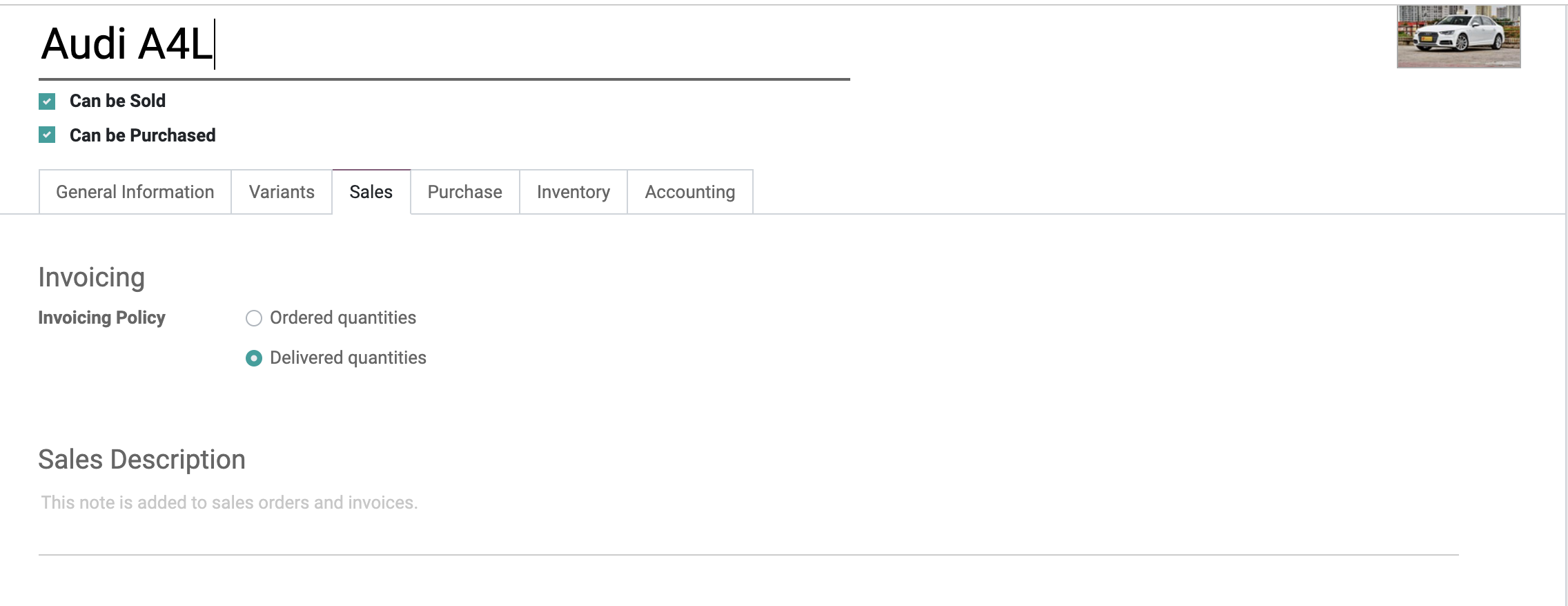
Two Core Invoicing Policies
Odoo natively supports two core invoicing policies.
The invoicing policy is usually maintained on the product. When creating an invoice from a sales order, Odoo uses the product invoicing policy and the current delivery status to determine the invoiceable quantity.
| Policy | Meaning | Suitable Scenario |
|---|---|---|
| Invoice ordered quantities | After the sales order is confirmed, the ordered quantity can be invoiced | Standard products, prepayment, contract amount invoicing |
| Invoice delivered quantities | Invoice based on actual delivered quantity after delivery | Partial delivery, bulk materials, actual-delivery settlement |
The default invoicing policy can be configured in Sales settings, and each product can also be adjusted separately. Default settings generally affect new or updated products; existing products should still be reviewed one by one.
Invoice Ordered Quantities
Invoice ordered quantities is straightforward.
Confirm quotation -> Sales order -> Create invoice -> Confirm invoice -> Register payment
This method is suitable when:
- The customer can be invoiced immediately after order confirmation.
- The company collects payment before delivery.
- The product is a standard service fee.
- The contract amount is fixed.
- Settlement does not need to wait for warehouse delivery.
The advantage is a simple process and earlier invoicing. The drawback is that if the actual delivered quantity changes later, the company may need a refund, credit note, or additional invoice.
Invoice Delivered Quantities
Invoice delivered quantities links invoicing with delivery results.
Confirm quotation -> Sales order -> Delivery / fulfillment -> Create invoice -> Invoice delivered quantity
This method is suitable for:
- Partial deliveries.
- Cases where actual delivery may differ from ordered quantity.
- Materials, liquids, food, or other products settled by actual quantity.
- Services that should be invoiced after delivery.
- Project, timesheet, milestone, or other delivery-driven work.
If a product is set to invoice delivered quantities but nothing has been delivered yet, the sales order may have no invoiceable quantity. When a user asks why an invoice cannot be created, check the product invoicing policy and delivered quantity first.
Create A Regular Invoice
After confirming the sales order, click Create Invoice.
Odoo opens a wizard. If Regular Invoice is selected, Odoo creates a draft customer invoice based on the current invoiceable quantity.
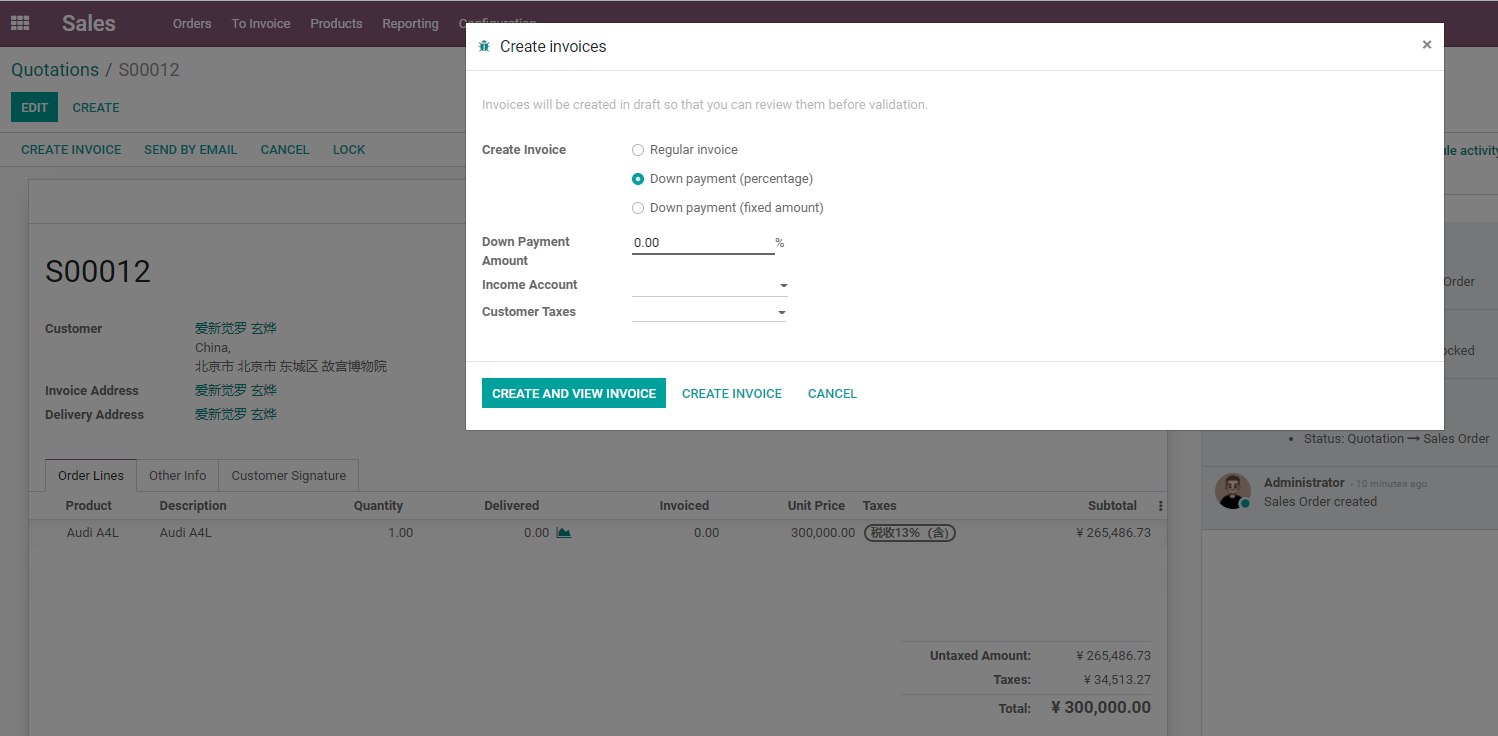
A regular invoice creates a draft invoice according to invoiceable quantity. After finance confirms it, the invoice enters the formal accounts receivable flow, and customer payment can be registered.
The To Invoice list in the Sales menu can show sales orders that already meet invoice conditions. Finance or sales managers can use it as a focused worklist for invoicing.
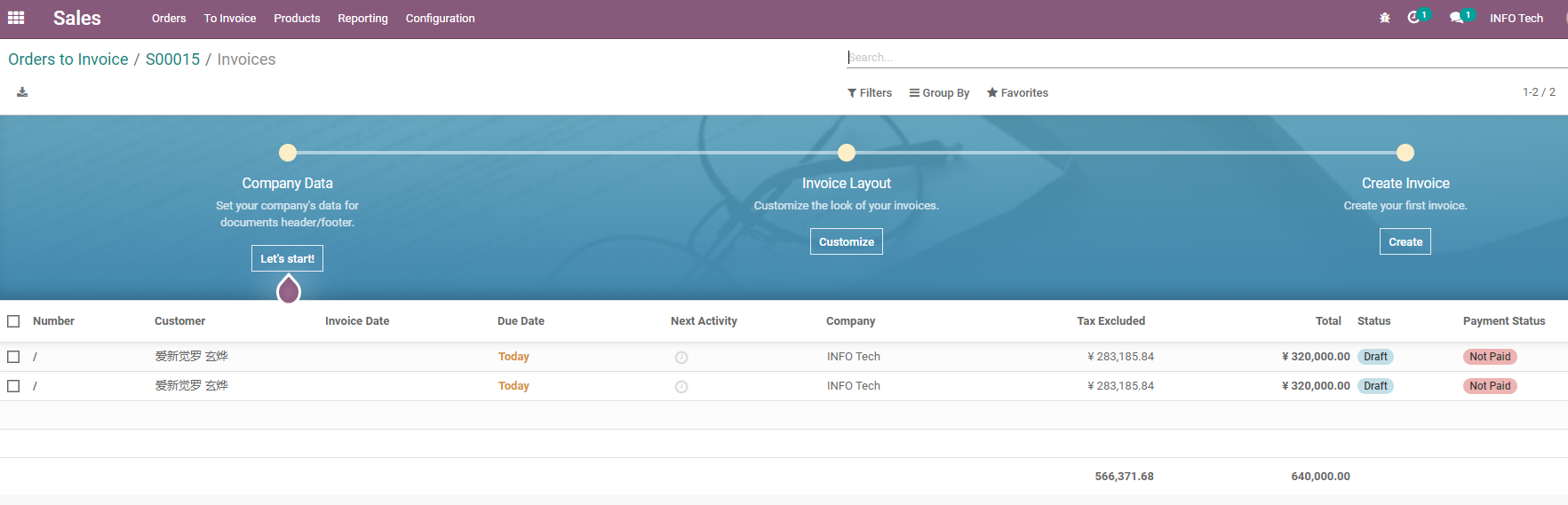
Keep these distinctions clear:
- A sales order is not an accounting invoice.
- A draft invoice is not yet formal receivable.
- Only a confirmed invoice enters accounting.
- Registering payment records the customer's payment.
- Bank reconciliation and final payment status also depend on accounting configuration.
Sales users do not need to master every accounting detail, but they should know that sales order, invoice, and payment are three different stages.
Down Payments
Down payments are suitable when the customer pays part of the amount first, and the remaining balance is settled later according to delivery or final settlement.
When choosing a down payment percentage or fixed amount, Odoo creates a down payment invoice.
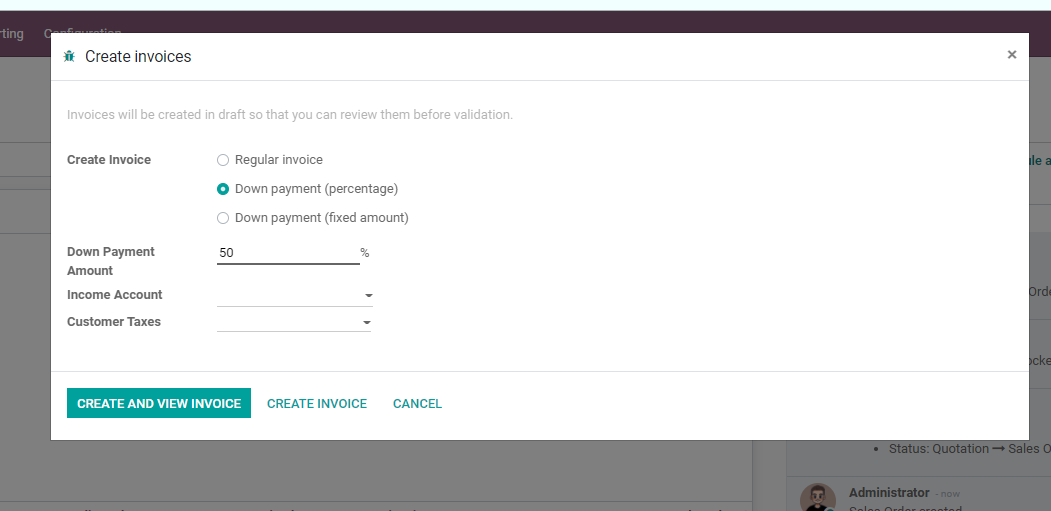
When creating an invoice, Odoo offers:
| Option | Meaning |
|---|---|
| Down payment percentage | Invoice a percentage of the sales order total, such as 30% |
| Down payment fixed amount | Invoice a fixed deposit amount, such as 5,000 |
| Regular invoice | Create a normal invoice based on invoiceable quantities |
Down payments are common in:
- Custom products.
- High-value equipment.
- Implementation projects.
- Cross-border orders.
- Rental deposits.
- Orders where customer credit risk requires payment first.
After the down payment invoice is confirmed and paid, Odoo deducts the down payment when the final invoice is created later, avoiding duplicate collection.
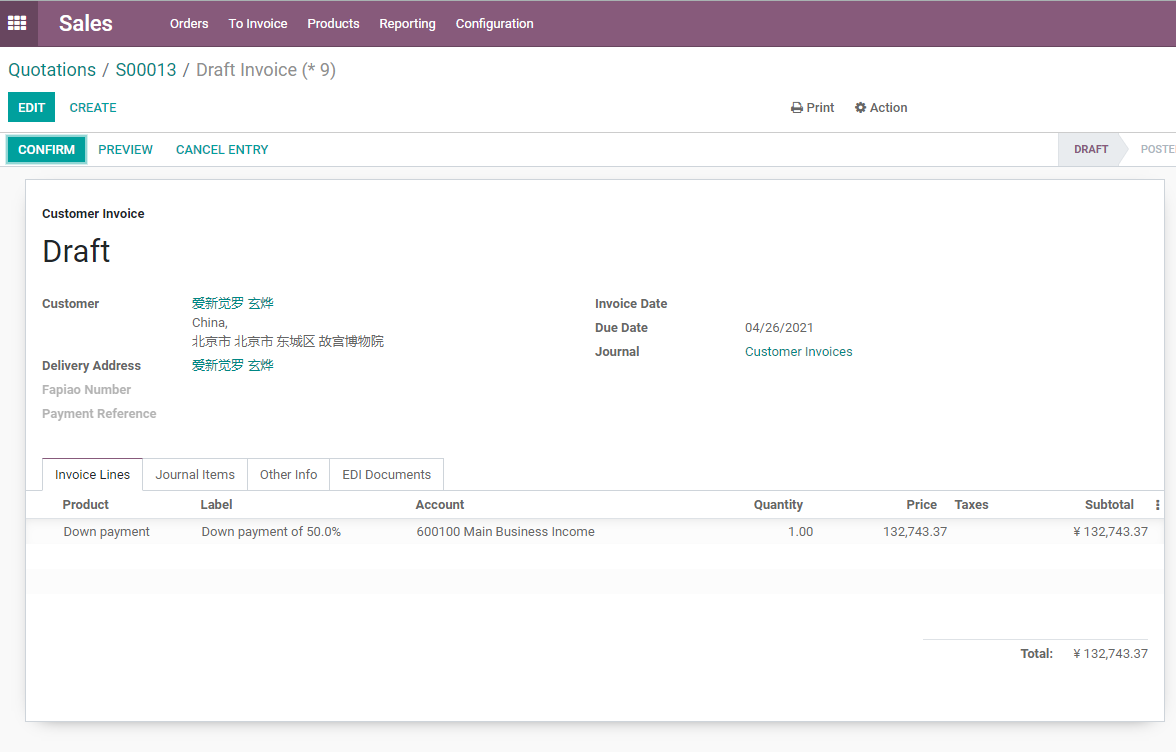
The example below is a down payment invoice. It represents a partial payment collected in advance, not necessarily the final settlement.
A 100% Down Payment Is Not The Final Invoice
One detail from Odoo's official behavior is easy to miss: a 100% down payment is not the same as completing final invoicing for the sales order.
It is still a down payment process. Odoo may still need a final invoice later to complete the sales order's settlement relationship.
So if the company simply wants to issue the full invoice once, it should usually use a regular invoice. If the business truly means full prepayment first, delivery later, and final settlement later, then a 100% down payment can be appropriate.
This distinction should be explained clearly during implementation. Otherwise finance may wonder why the system still allows invoice creation after the customer has already paid 100%.
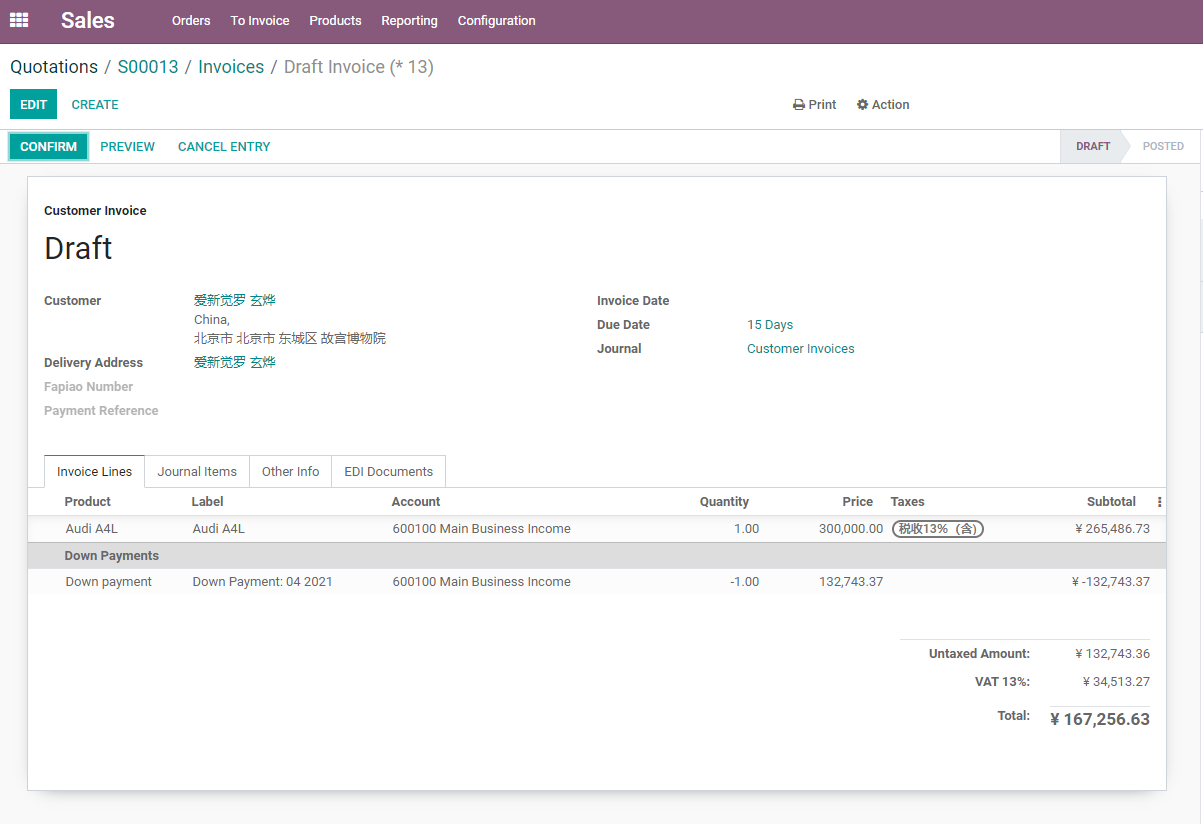
When the final invoice is created, Odoo automatically deducts previous down payments to avoid collecting twice.
Pro-Forma Invoice
A pro-forma invoice is usually used to let the customer preview payment information or provide import/export documents before formal invoicing. It is not a formal accounting invoice.
It is useful when:
- An export customer needs a Pro-forma Invoice before payment.
- The customer's internal approval requires a payment document.
- Commercial documents are needed before goods are shipped.
- The company does not want to create formal receivable yet.
Do not confuse a pro-forma invoice with a formal invoice. It can be a commercial preview document, but the document that enters accounts receivable is still the customer invoice.
Relationship Between Sales Invoicing And Inventory
Invoicing policy affects how sales and inventory work together.
| Product Invoicing Policy | Inventory Impact | Invoicing Impact |
|---|---|---|
| Ordered quantities | Delivery does not affect invoiceable quantity | Usually invoiceable after order confirmation |
| Delivered quantities | Delivery quantity must be completed | Invoiceable quantity appears after delivery |
If inventory is enabled, confirming a sales order usually creates a delivery order. After the warehouse completes delivery, delivered quantity updates and finance invoices according to the policy.
If the company sells services, delivered quantity may come from manual delivery, project milestones, timesheets, or another service delivery mechanism.
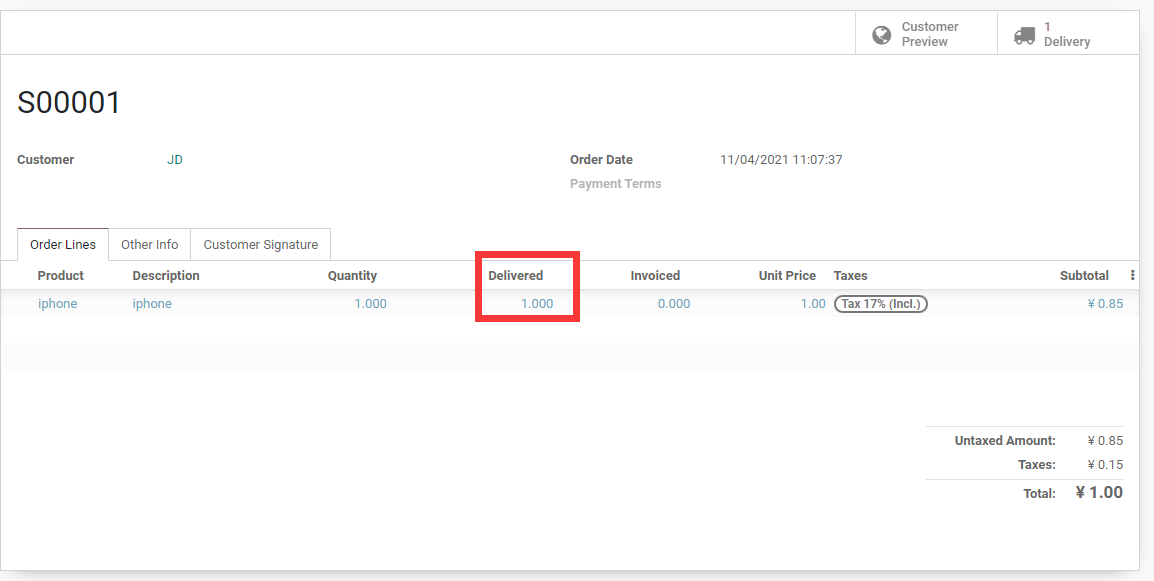
Delivered quantity and invoiced quantity on the sales order line are key indicators for deciding whether the next invoice can be created.
Implementation Advice
Invoicing policy should not be decided by sales alone. Finance and business owners must confirm it together.
Recommended patterns:
| Product Type | Common Recommendation |
|---|---|
| Standard stock item | Ordered or delivered quantities, depending on cash-before-delivery policy |
| Partial-delivery item | Usually delivered quantities |
| Custom product | Down payment plus final invoice |
| Service product | Ordered quantity, timesheet, or milestone according to service delivery |
| Implementation project | Down payments, stage payments, or milestone invoicing |
| Export order | Often combines pro-forma invoice, down payment, and final invoice |
This chapter clarified sales invoicing policies, regular invoices, down payments, 100% down payment behavior, pro-forma invoices, and the relationship between invoicing and inventory delivery. The next chapter looks at pricelists, discounts, and multi-currency pricing, solving sales pricing across different customers, markets, and currencies.