Chapter 5 Product Basics
Odoo natively uses one product record system to connect Sales, Purchase, Inventory, Manufacturing, POS, eCommerce, and Accounting. When a company implements Odoo for the first time, product data is often one of the most important and most underestimated types of master data.
A product is not just a "product name." Product type affects whether inventory is deducted. Product category affects reporting and accounting rules. Units affect purchase and stock quantities. Barcodes affect POS and warehouse scanning. Prices and taxes affect quotations, invoices, and margins. This chapter explains how to understand native Odoo product data and how to design product master data before go-live.
Why Products Matter
In Odoo, the same product can appear across many business steps:
Sales quotation -> Sales order -> Delivery -> Invoice -> Payment
Purchase RFQ -> Purchase order -> Receipt -> Vendor bill -> Payment
Inventory count -> Transfer -> Lots and serial numbers -> Cost valuation
POS checkout -> Website shop -> Manufacturing BOM -> Project service invoicing
If product data is wrong, the impact is not limited to one page. It affects the whole business chain.
Common consequences:
- Physical goods are created as services, so inventory does not decrease after sale;
- Service items are created as goods, so the system asks the warehouse to deliver them;
- Unit settings are wrong, so purchase receipt and sales delivery quantities do not match;
- Taxes are wrong, so invoice amounts and tax amounts are wrong;
- Product categories are messy, so sales analysis, inventory valuation, and accounting accounts are hard to separate;
- Variants are abused, causing the number of products to explode and making selection difficult;
- Barcodes are duplicated, causing POS or warehouse scanning errors.
Product master data should be designed carefully before go-live. It is not recommended to create products temporarily while entering formal orders.
Open The Product List
After installing the Sales application, open products from Sales -> Products -> Products.
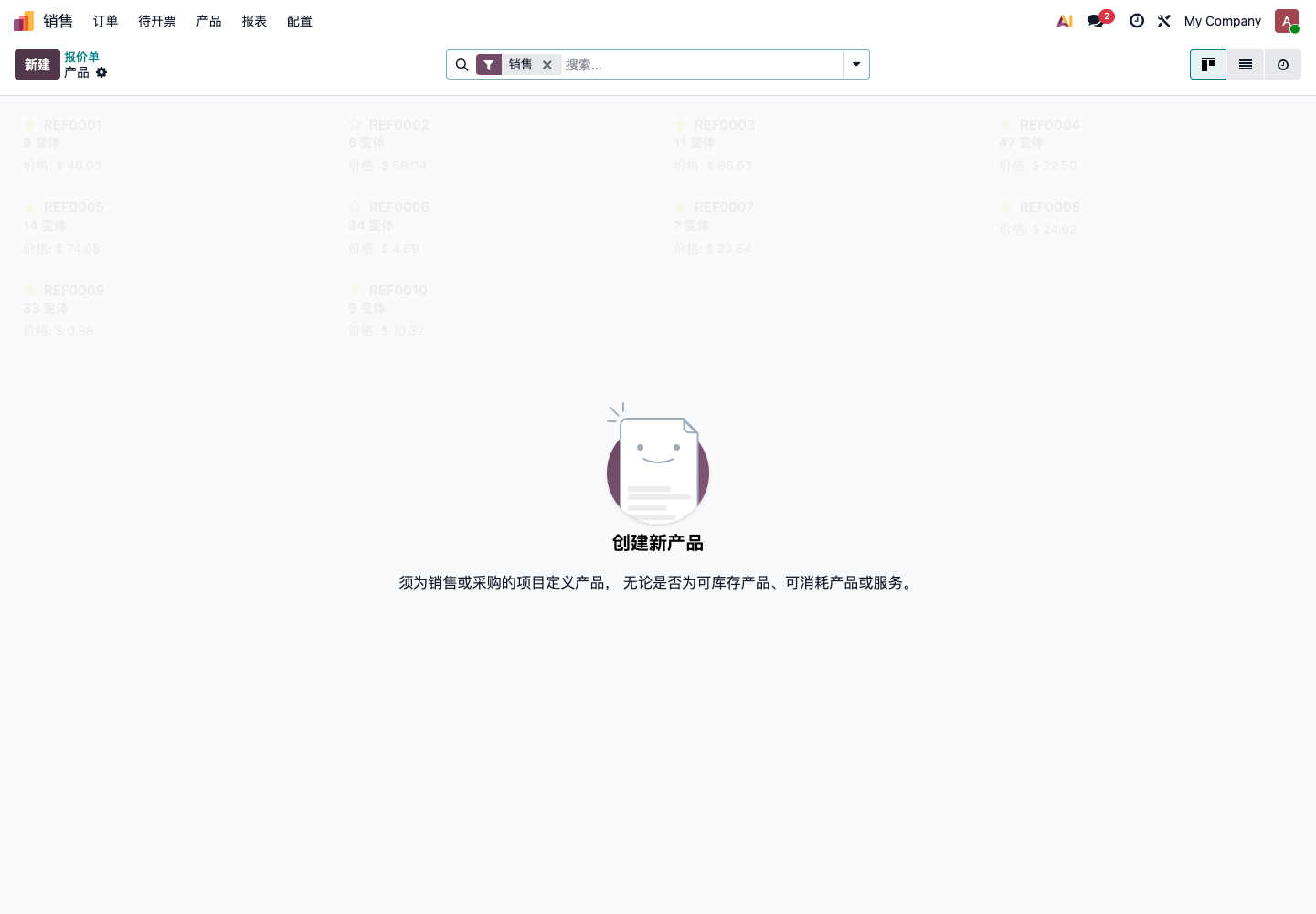
Products can also be opened from Purchase, Inventory, POS, Manufacturing, eCommerce, and other modules. Different entries use the same product data behind the scenes.
Create A Product
Click New to create a product.
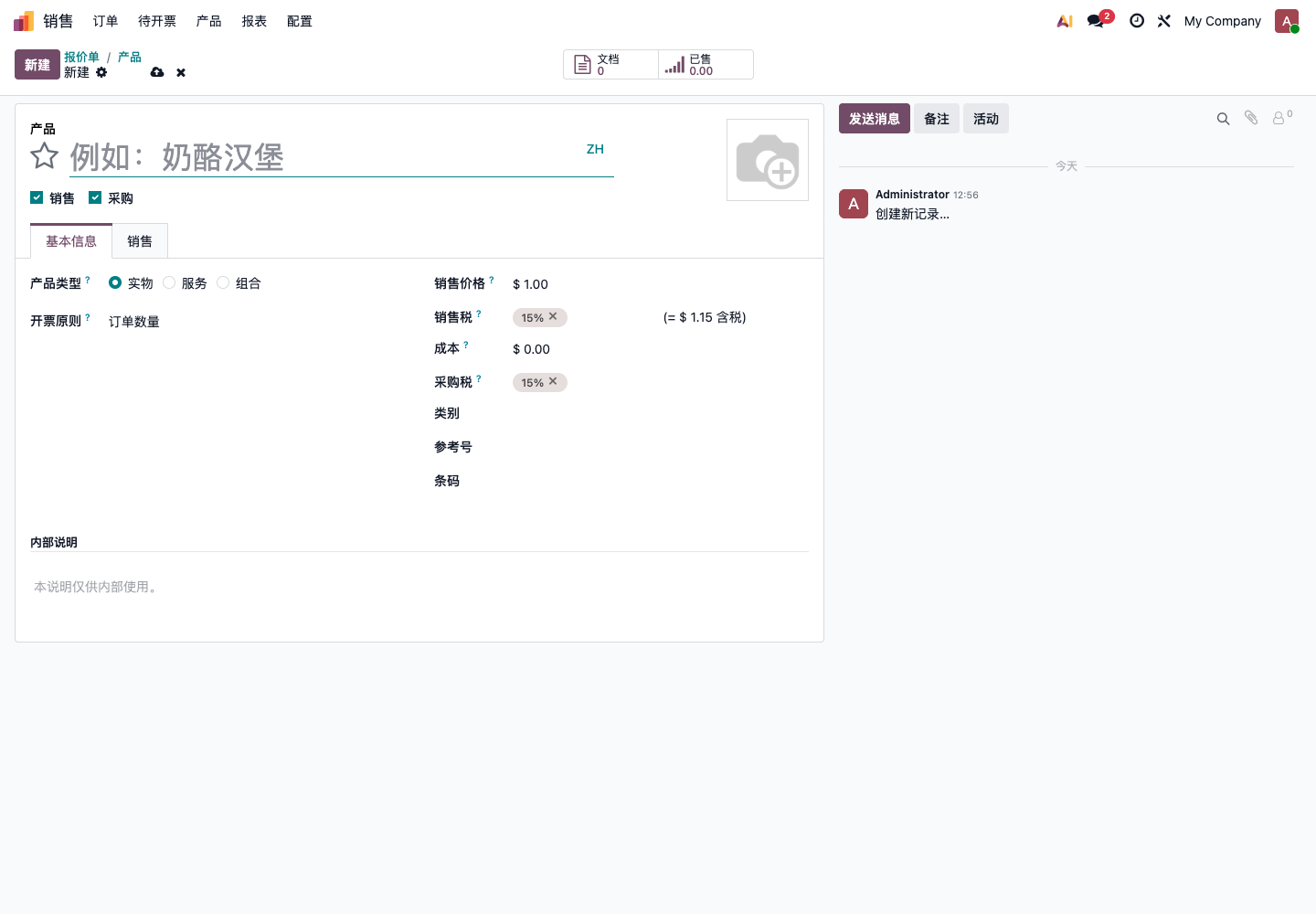
For phase one, maintain the key fields first. Do not fill every field from the beginning, and do not import a large amount of unconfirmed data just to make the product list look complete.
Product Template And Product Variants
Before understanding products, distinguish two concepts:
| Concept | Description | Example |
|---|---|---|
| Product template | Shared data for a product family | T-shirt |
| Product variant | Specific attribute combination under a template | Red/M T-shirt, Blue/L T-shirt |
If a product has no color, size, or specification differences, it can be used as a normal product. If it has attributes such as color, size, capacity, or material, variants may be considered.
Variants are suitable for:
- Clothing color and size;
- Phone capacity and color;
- Food specifications;
- Material thickness and dimensions;
- Different packaging specifications of the same item.
Do not abuse variants for:
- One customized item per customer;
- Different specifications for every order;
- Only making product names shorter;
- Many attribute combinations but very few actually sold;
- Classification only, not inventory or price differentiation.
Variants affect sales, purchase, inventory, barcodes, images, prices, and statistics. If unsure in phase one, first run the process with normal products, then plan variants.
Basic Product Fields
| Field | Description | Recommendation |
|---|---|---|
| Product name | Internal and external display name | Required; keep naming stable |
| Sales | Whether the product can appear on sales orders | Enable for sellable items |
| Purchase | Whether the product can appear on purchase orders | Enable for purchasable items |
| Product type | Goods, service, or combo | Affects inventory and business process |
| Sales price | Default price on sales orders | Spot-check before go-live |
| Cost | Used for cost and margin analysis | Confirmed by finance or purchase |
| Sales tax | Tax on customer invoices | Confirmed by finance |
| Purchase tax | Tax on vendor bills | Confirmed by finance |
| Category | Product grouping and accounting/inventory rules | Do not put everything into the default category |
| Internal reference | Internal code or SKU | Should be unique |
| Barcode | POS, warehouse scanning, quick search | Required if scanning is used |
Product codes, names, and categories should be standardized before import. Avoid having the same product written as "iPhone Case," "IPHONE shell," and a local-language variant at the same time.
Product Type
Product type determines whether the product participates in inventory and how later business documents flow.
| Type | Suitable Scenario | Impact |
|---|---|---|
| Goods | Stocked products, raw materials, finished goods | Participates in receipts, deliveries, inventory counts, and inventory analysis |
| Service | Consulting, installation, freight, labor service | Usually does not generate stock moves |
| Combo | Packages or bundle sales | Suitable for specific bundle scenarios |
If a product needs inventory management, it should usually be Goods. If it is consulting, installation, freight, labor, or another item that does not require stock movement, it should usually be Service.
Important judgment: what the customer calls a "product" is not always a stockable product. Installation fees, freight, design fees, and service fees may appear on quotations, but they should not make the warehouse deliver anything.
Can Be Sold And Can Be Purchased
The Sales and Purchase options on the product form decide whether the product is used in the corresponding process.
| Selection | Suitable Scenario |
|---|---|
| Sales only | Sold but not purchased, such as service products |
| Purchase only | Purchased but not sold, such as office supplies |
| Both Sales and Purchase | Trading goods that can be bought and sold |
| Neither | Paused or internal reference data |
If a product cannot be selected on a sales order, first check whether Sales is enabled. If it cannot be selected on a purchase order, first check whether Purchase is enabled.
For products that are no longer used, do not delete them directly. Disable Sales and Purchase or archive the product to avoid affecting historical orders and reports.
Sales Price, Cost, And Margin
Sales price is the default unit price on sales orders. Cost is used for margin analysis, inventory valuation, and business decisions.
Common ownership:
| Field | Confirmed By | Impact |
|---|---|---|
| Sales price | Sales or operations | Quotation and order amount |
| Cost | Purchase, warehouse, or finance | Margin, inventory value, cost analysis |
| Sales tax | Finance | Customer invoice tax amount |
| Purchase tax | Finance | Vendor bill tax amount |
Do not let sales maintain cost alone, and do not let finance ignore product taxes. Product price, cost, and taxes should be spot-checked before go-live.
If the company has complex pricing, such as customer-level prices, wholesale prices, member prices, channel prices, or tiered prices, use pricelists instead of creating duplicate products.
Product Categories
Product category is not just a category name. It can also affect inventory valuation, accounting accounts, and reporting statistics.
For phase one, consider categories such as:
- Finished goods;
- Raw materials;
- Packaging materials;
- Services;
- Freight;
- POS goods;
- Spare parts;
- Consumables.
Do not put every product into one "All" category. Later inventory and finance analysis will become hard to separate.
Category design suggestions:
| Principle | Description |
|---|---|
| Not too broad | If everything is in one category, reports cannot analyze properly |
| Not too detailed | One category per product creates high maintenance cost |
| Discuss with finance | Categories may affect accounts and inventory valuation |
| Discuss with warehouse | Categories affect inventory statistics and replenishment judgment |
| Discuss with sales | Categories affect sales analysis and product filtering |
If inventory valuation and accounting integration are enabled, product categories become more important. Finance must confirm them before go-live.
Units Of Measure
Product units affect sales quantities, purchase quantities, inventory quantities, and prices.
Common units:
- Piece;
- Box;
- Kilogram;
- Meter;
- Set;
- Hour;
- Time.
Before go-live, confirm:
| Question | Example |
|---|---|
| Are sales unit and inventory unit the same? | Sold by box, stocked by piece |
| Are purchase unit and inventory unit the same? | Purchased by kilogram, stocked by gram |
| Is packaging needed? | One box contains 24 pieces |
| Is a second unit needed? | Fabric managed by both meters and kilograms |
Do not change units casually. After sales, purchase, or inventory documents exist, changing units affects the interpretation of historical quantities. For stock products, unit rules should be finalized before production go-live.
If the business has complex unit conversion, do not solve it only by writing notes in the product name. Evaluate Odoo units, packaging, or a custom solution first.
Packaging And Barcodes
Barcodes are commonly used for:
- POS checkout;
- Warehouse receiving scan;
- Warehouse delivery scan;
- Inventory counts;
- Quick product search.
One barcode should not correspond to multiple products, otherwise scanning becomes confusing.
Packaging is useful for scenarios such as "how many pieces in a box" or "how many units in a pack." For example, the inventory unit may be piece, while purchase and sales often happen by box. In this case, packaging or unit conversion should be planned, instead of only writing "24 pieces per box" in the product name.
Before go-live, confirm:
| Check Item | Description |
|---|---|
| Barcode uniqueness | One barcode corresponds to one product or one variant |
| Barcode source | Manufacturer barcode, internal barcode, or newly generated code |
| Packaging rules | Whether boxes, packs, pallets, and quantities are fixed |
| POS display | Whether stores need images and short names |
| Warehouse scanning | Whether receiving, delivery, and inventory count use scanning |
Sales Tab And Invoicing Policy
Sales-related fields on the product form affect sales orders and invoices.
Common invoicing policies:
| Invoicing Policy | Description | Suitable Scenario |
|---|---|---|
| Ordered quantities | Invoice based on confirmed sales order quantity | Standard product sales, advance invoicing |
| Delivered quantities | Invoice based on actual delivered quantity | Partial delivery, service delivered before invoicing |
Different businesses should use different invoicing policies. For example, a service project may want to invoice based on delivered milestones, while standard goods may invoice based on ordered quantity.
If the customer often ships and invoices partially, test the product invoicing policy together with the sales flow.
Purchase And Vendor Prices
Purchasable products usually need vendor information.
Vendor prices can record:
- Vendor;
- Minimum purchase quantity;
- Purchase price;
- Lead time;
- Vendor product code;
- Vendor product name;
- Currency.
This information affects default prices and lead times on purchase orders. If the company wants automatic replenishment, purchase by vendor, or purchase price analysis, sales price alone is not enough.
Inventory Tracking And Replenishment
If goods enter inventory management, tracking and replenishment should also be considered.
Common questions:
| Question | Description |
|---|---|
| Is inventory managed? | Not every product needs stock quantity |
| Is lot tracking needed? | Common for food, medicine, and materials |
| Is serial number tracking needed? | Common for equipment, phones, and valuable goods |
| Is safety stock needed? | Notify or replenish when stock is below a level |
| Is automatic purchase needed? | Whether shortage should trigger purchase demand |
These topics are explained in the Inventory chapters. In the product chapter, remember one point: inventory behavior is not decided only by warehouse operations. Product master data already determines many inventory behaviors.
Routes, Replenishment, And Manufacturing
After installing Inventory, Purchase, Manufacturing, and related apps, route and replenishment settings may appear on products. They decide whether the system should suggest purchase, manufacturing, transfer, or make-to-order replenishment when there is demand or shortage.
Common route meanings:
| Route | Business Meaning | Common Scenario |
|---|---|---|
| Buy | Needs purchase from vendor | Trading goods, raw materials |
| Manufacture | Needs manufacturing order | Finished goods, semi-finished goods |
| Replenish on Order | Replenish only after sales demand exists | Non-stocked or customized products |
| Dropship | Vendor ships directly to customer | Goods not passing through company warehouse |
Do not judge routes only by field name. Evaluate the actual delivery method. The same product may be delivered from stock for normal sales, purchased on order for special customers, or dropshipped in cross-border business. Wrong routes may cause purchase suggestions or manufacturing orders not to generate, or may trigger incorrect warehouse flows.
If the product is related to manufacturing, further confirm BOMs, routings, semi-finished goods, raw material units, and scrap logic. If product master data is unclear, MRP planning is usually inaccurate.
Products And Accounting Rules
Products affect finance, but in real projects it is usually not recommended to configure complex accounting accounts on every product. A more common approach is to manage accounting rules through product categories first, then adjust a few special products separately.
Finance should confirm:
| Item | Impact |
|---|---|
| Sales tax | Customer invoice tax amount |
| Purchase tax | Vendor bill tax amount |
| Income account | Sales revenue collection |
| Expense account | Purchase cost or expense collection |
| Inventory valuation account | Used when automatic inventory valuation is enabled |
| Costing method | Standard cost, average cost, FIFO, and related cost logic |
If the company only wants to run Sales, Purchase, and Inventory first, confirm taxes, categories, and costs. If phase one includes inventory valuation and automated accounting entries, product categories and accounting accounts must be designed before large amounts of inventory are entered.
Products In POS And Website Shop
If the company uses POS or Website/eCommerce, products also affect front-end display.
POS commonly cares about:
- Whether the product is available in POS;
- Whether barcode is correct;
- Whether product image is clear;
- Whether product category helps cashiers find it quickly;
- Whether price and tax are correct;
- Whether it participates in promotions, member prices, or gift card rules.
Website shop commonly cares about:
- Whether the product is published on the website;
- Product images and details;
- Variant selection;
- Inventory display;
- Freight and weight;
- SEO information;
- Whether it participates in coupons, promotions, and member prices.
If the same product is used in backend sales, POS, and website, align naming, images, prices, and inventory strategy in advance.
Product Images
Product images are not required, but they are helpful for POS, website shops, and sales presentation.
Recommendations:
- Upload images for POS and website products when possible;
- Internal consumables can skip images;
- Use moderate image sizes and avoid very large originals;
- Keep image style consistent for similar products.
Bigger images are not always better. Oversized images may slow down website and POS loading.
Product Coding Rules
Product code is also called internal reference or SKU. Codes should be unique, stable, and readable.
Recommended principles:
- One product or variant has one code;
- Do not put too much meaning into the code;
- Do not frequently change codes that are already used;
- Use the same code across systems when possible;
- Deduplicate before import.
Not recommended:
- Using vendor codes directly as internal codes, because different vendors may duplicate them;
- Using product name abbreviations as unique codes, which easily conflicts later;
- Putting color, size, vendor, year, and category into one very long code;
- Having no code and identifying products only by name.
If the company connects to eCommerce, POS, barcode warehouse, external ERP, or accounting systems, coding rules are especially important.
Product Data Design Sequence
When preparing product data for the first time, follow this sequence:
- Define product scope and remove clearly inactive or invalid data;
- Standardize product names and internal references;
- Distinguish goods, services, and combos;
- Confirm can be sold and can be purchased;
- Design product categories;
- Confirm units and packaging;
- Confirm sales price, cost, sales tax, and purchase tax;
- Prepare barcodes and images;
- Decide whether variants are needed;
- Decide whether routes, replenishment, lots, or serial numbers are needed;
- Import into the test database and spot-check.
Do not import all historical products at the beginning. It is better to import the valid products that are still being sold, purchased, and stocked.