Chapter 4 Test Database Rehearsal Method
A test database is not for "looking around the interface." It is for simulating real business. Only after real roles, realistic data, and real exceptions have been tested can the company judge whether Odoo is ready for go-live.
This chapter provides a testing method suitable for beginners. Following it helps turn "it feels almost ready" into "these processes have been confirmed."
What Makes Testing Effective
Effective testing is not an administrator clicking a few buttons casually. It should meet at least four conditions:
- Use data close to real business;
- Use real role accounts, not only the administrator;
- Run complete processes, not only create one document;
- Record issues, owners, and resolutions.
If only the implementer or owner tests with the administrator account, many permission issues, handover issues, and exception processes will not be exposed.
Preparation Before Testing
Prepare a minimum data set before testing.
| Data | Suggested Quantity | Usage |
|---|---|---|
| Customers | 2 to 3 | Test quotations, sales orders, payments, reconciliation |
| Vendors | 2 to 3 | Test purchase orders, receipts, vendor bills |
| Products | 5 to 10 | Cover goods, services, different taxes, or different units |
| Warehouses | 1 to 2 | Test receipts, deliveries, transfers, inventory counts |
| Users | 1 per role | Test permissions and role processes |
| Bank statement lines | 3 to 5 | Test receipts, payments, and bank reconciliation |
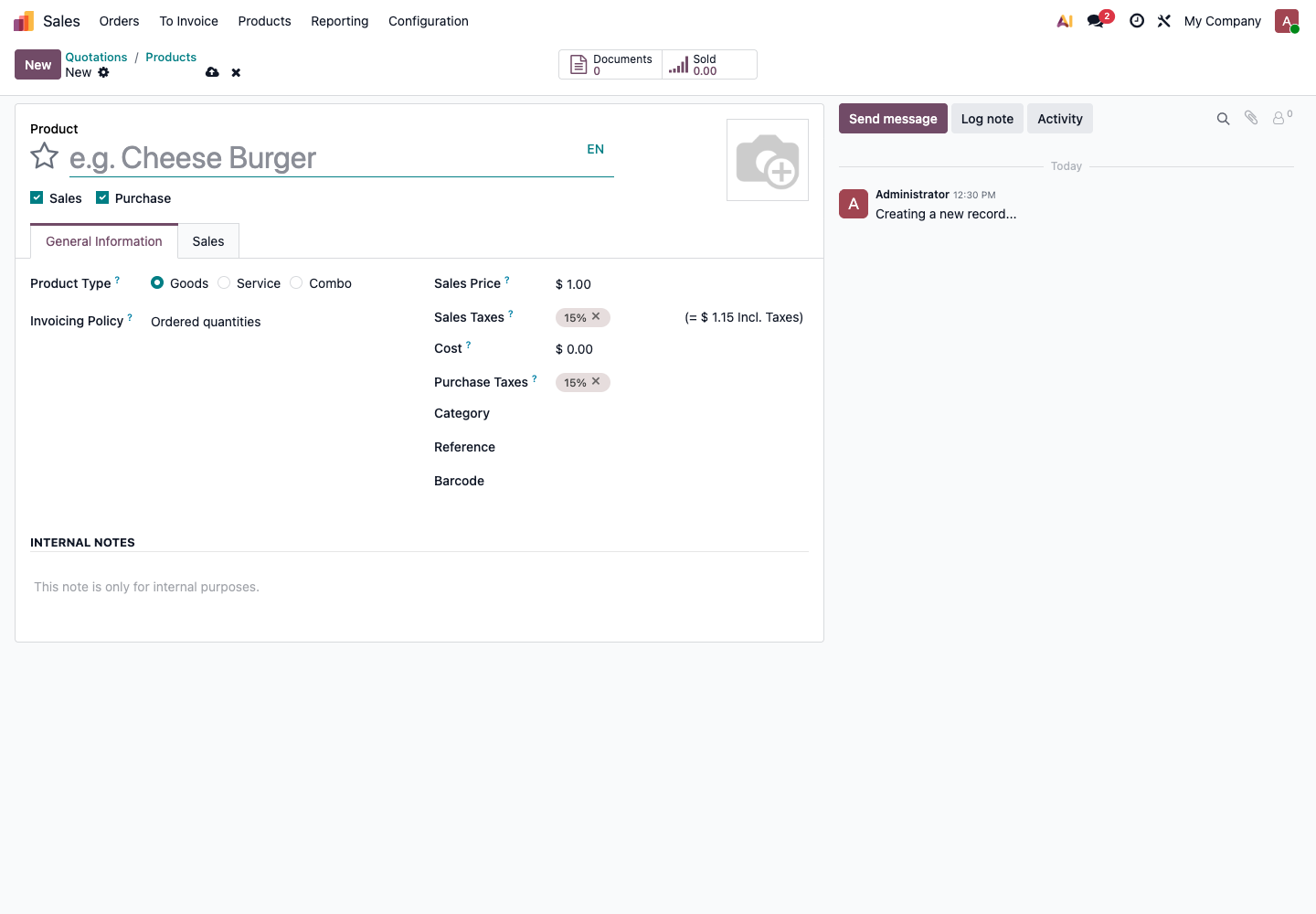
Products can be created from the Sales application's Products menu. Do not start by importing thousands of products for testing, or the problems will be buried under data volume.
Test Roles
Prepare at least these roles:
| Role | Responsible For Testing |
|---|---|
| Sales | Customers, quotations, sales orders, sales invoice requests |
| Purchase | Vendors, requests for quotation, purchase orders |
| Warehouse | Receipts, deliveries, transfers, inventory counts |
| Finance | Customer invoices, vendor bills, payments, bank reconciliation |
| Manager | Reports, approvals, key business review |
| Administrator | System settings, permission adjustment, issue investigation |
Each role should log in with its own account. This is the only way to know whether permissions are enough.
Process 1: Sales To Payment
This is usually the first process most companies need to complete.
Customer -> Quotation -> Sales Order -> Delivery -> Customer Invoice -> Payment -> Reconciliation
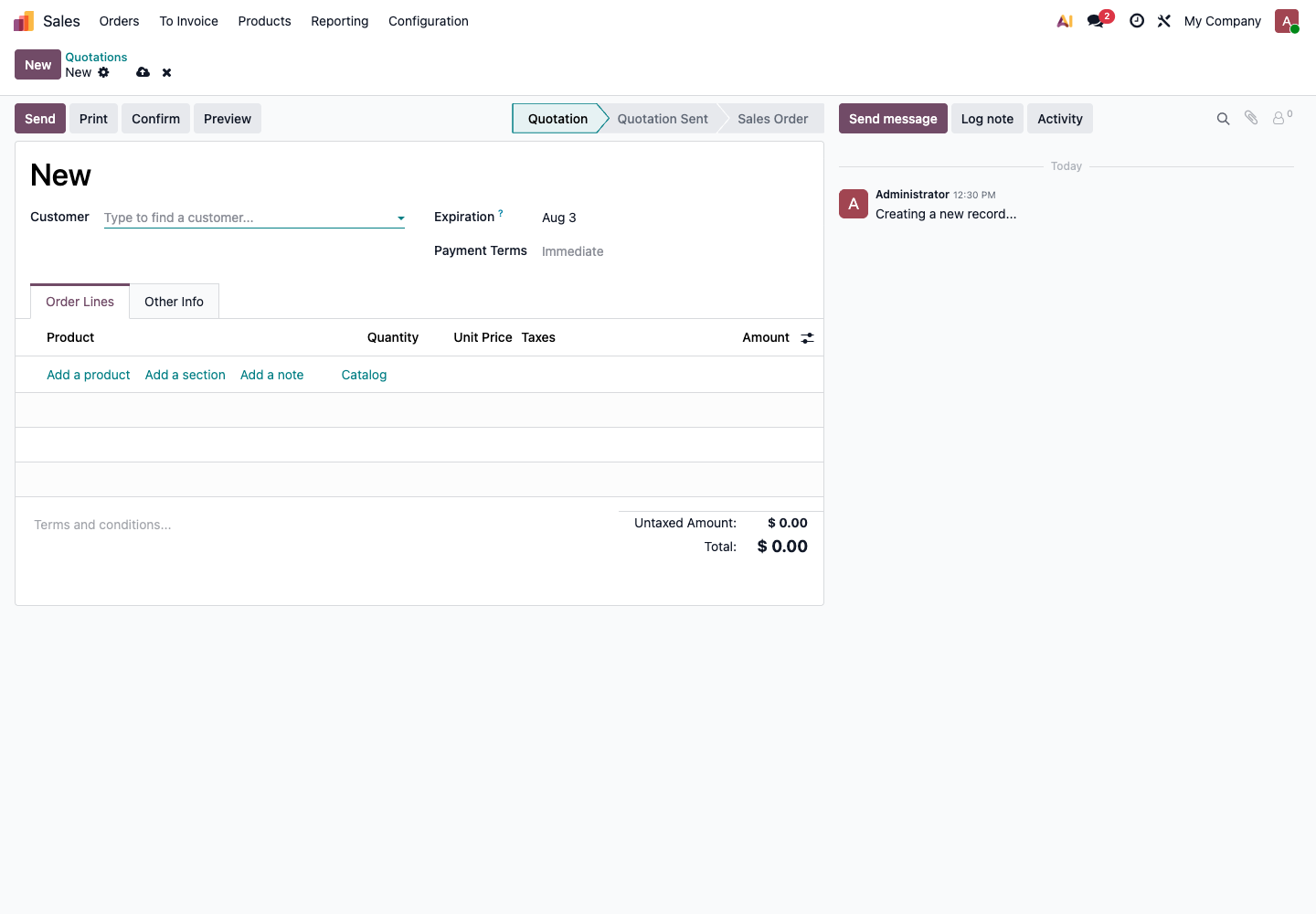
When creating a quotation in Sales, test at least customer, product, quantity, price, tax, and payment terms.
Testing steps:
- Sales creates a customer;
- Sales creates a quotation;
- Sales adds products, quantities, unit prices, and taxes;
- Sales sends or prints the quotation;
- After customer confirmation, convert the quotation into a sales order;
- Warehouse processes the delivery;
- Finance creates the customer invoice;
- Finance registers customer payment;
- Finance checks receivables and reconciliation status.
Acceptance standard:
| Check Item | Passing Standard |
|---|---|
| Quotation | Customer, product, price, and taxes are correct |
| Order | Status changes correctly after quotation confirmation |
| Delivery | Inventory quantity decreases after delivery |
| Invoice | Invoice amount matches order amount |
| Payment | Customer receivable decreases |
| Reports | Sales revenue and receivables can be found |
Process 2: Purchase To Payment
The purchase process validates vendors, purchase prices, receipts, and vendor bills.
Vendor -> Request for Quotation -> Purchase Order -> Receipt -> Vendor Bill -> Payment -> Reconciliation
Testing steps:
- Purchase creates a vendor;
- Purchase creates a request for quotation;
- Purchase adds products, quantities, and purchase prices;
- Confirm the purchase order;
- Warehouse receives goods;
- Finance creates the vendor bill;
- Finance registers vendor payment;
- Finance checks payables.
Acceptance standard:
| Check Item | Passing Standard |
|---|---|
| Purchase order | Vendor, product, quantity, and price are correct |
| Receipt | Inventory quantity increases after receipt |
| Bill | Bill amount can match the purchase order |
| Payment | Vendor payable decreases |
| Reports | Payables and purchase statistics can be found |
Process 3: Inventory Count And Transfer
Any company that manages physical inventory must test inventory flows.
Testing steps:
- Check current stock of a product;
- Perform an inventory adjustment;
- Perform an internal transfer;
- Perform a sales delivery;
- Perform a purchase receipt;
- Check whether inventory quantity changes as expected.
Acceptance standard:
| Check Item | Passing Standard |
|---|---|
| On-hand stock | The system quantity can be explained |
| Inventory count | Quantity is correct after adjustment |
| Transfer | Source location decreases and destination location increases |
| Receipt | Inventory increases after purchase receipt |
| Delivery | Inventory decreases after sales delivery |
If the company uses lots or serial numbers, test traceability and serial number uniqueness separately.
Process 4: Financial Reconciliation
Financial testing should not only check whether invoices can be created. It must also test payments and bank reconciliation.
Testing steps:
- Create a customer invoice;
- Register a customer payment;
- Import or manually create a bank statement line;
- Match the bank statement line with the payment or invoice;
- Check whether the receivable is closed;
- View the aged receivable report.
Acceptance standard:
| Check Item | Passing Standard |
|---|---|
| Invoice | Amount, taxes, and customer are correct |
| Payment | Payment amount and date are correct |
| Bank statement | Statement line enters the bank journal |
| Reconciliation | Bank statement can match the invoice or payment |
| Aging | Paid invoices no longer appear as unpaid |
For domestic Chinese customers, remember that an Odoo customer invoice is an accounting receivable document, not a Chinese tax-control invoice. Confirm separately whether the company needs integration with a tax invoicing platform.
Exception Flow Testing
Testing only the happy path is not enough. Real business always has exceptions.
At minimum, test these cases:
| Exception Scenario | What To Verify |
|---|---|
| Quotation cancellation | Whether the canceled quotation can still be delivered or invoiced by mistake |
| Partial sales delivery | Whether the undelivered quantity remains |
| Customer return | Whether inventory increases and receivables are handled correctly |
| Partial customer payment | Whether receivable balance is correct |
| Partial purchase receipt | Whether the unreceived quantity remains |
| Vendor bill amount mismatch | Whether finance can identify the difference |
| Insufficient employee permission | Whether the system blocks unauthorized operations |
| Incorrect product price | Whether old and new orders behave as expected after correction |
Exception testing is where many problems are discovered. Do not be afraid of making the test database messy. That is what it is for.
Test Issue Log
Every test issue should be recorded. Do not only write "this is wrong" in a chat group; it will be forgotten quickly.
Use a format like this:
| No. | Module | Role | Issue Description | Expected Result | Actual Result | Solution | Owner | Status |
|---|---|---|---|---|---|---|---|---|
| T001 | Sales | Sales | Quotation tax is incorrect | Default 13% | Shows 15% | Adjust product tax | Finance | To Do |
| T002 | Inventory | Warehouse | Stock did not decrease after delivery | Stock decreases | No change | Check product type | Consultant | Solved |
Recommended statuses:
- To confirm;
- To do;
- Solved;
- Not handled for now.
"Not handled for now" also needs a reason. For example, the issue belongs to phase-two optimization, or native Odoo does not support it and later customization is required.
Test Passing Standard
Passing the test does not mean there are no issues. It means the key processes are usable and remaining issues have clear handling plans.
Use this standard:
| Item | Passing Standard |
|---|---|
| Main process | At least one complete Sales, Purchase, Inventory, and Finance chain has been completed |
| Exception process | Cancellation, return, partial receipt, and partial payment have been tested |
| Permissions | Each role can complete its own work and cannot do what it should not do |
| Data | Customers, products, inventory, and accounting data are spot-checked |
| Reports | Management and finance can understand key reports |
| Issues | All issues required before go-live are closed |
| Cutover | Formal go-live date and old-system stop rule are confirmed |
If these standards are not met, do not go live directly.
Difference Between Trial Run And Formal Go-Live
After testing passes, the company can enter a trial run. A trial run is not the same as formal go-live.
| Stage | Purpose | Data Requirement |
|---|---|---|
| Test database rehearsal | Find issues and practice processes | Test data can be used |
| Trial run | Validate the system with real business | Use data close to real business |
| Formal go-live | Odoo becomes the only source of business data | Use official data and stop new entries in the old system |
During the trial run, the old system can remain available for lookup, but do not keep double entry for a long time. If the same transaction is entered into two systems, the data will eventually fail to match.
Common Pitfalls For Beginners
- Testing only document creation, not later delivery, invoicing, and payment;
- Testing only normal flows, not cancellation, return, or partial payment;
- Testing only with the administrator account, not real role accounts;
- Reporting issues only in chat, without an issue list;
- Using test data that is too casual and very different from real business;
- Changing requirements frequently during testing, so acceptance never finishes;
- Management not participating in report acceptance and discovering definition issues only after go-live.
The purpose of testing is not to prove that the system is perfect. It is to discover in advance which areas need configuration, training, or phase-two optimization. Once problems are visible, the project has already moved forward.