Chapter 7 Taxes And Fiscal Positions
Taxes on sales order lines affect quotation totals, customer invoices, financial reports, and compliance declarations. Odoo natively handles sales tax through taxes, fiscal positions, and default taxes on products and customers. For customers, tax may look like only one field on an order line. For implementers, it connects countries, accounting accounts, invoices, and customer types.
This chapter explains the sales tax and fiscal position concepts used most often in sales implementation. Industry-specific taxes such as excise duty are explained later as sales extensions.
Where Sales Tax Comes From
The tax on a sales order line usually comes from the product.
| Source | Purpose |
|---|---|
| Product sales tax | Default tax used on sales orders and customer invoices |
| Customer fiscal position | Maps taxes according to customer region or tax identity |
| Company localization package | Preloads taxes when the database is created for a country |
| Manual adjustment | Used only for special business cases |
Do not let salespeople change taxes casually. Taxes should be confirmed by finance; sales users should normally only use them.
Tax Configuration
Taxes are usually maintained under Accounting -> Configuration -> Taxes.
The example below shows a tax configuration. A tax is not only a percentage. It can also include calculation method, scope, accounting impact, and display behavior.
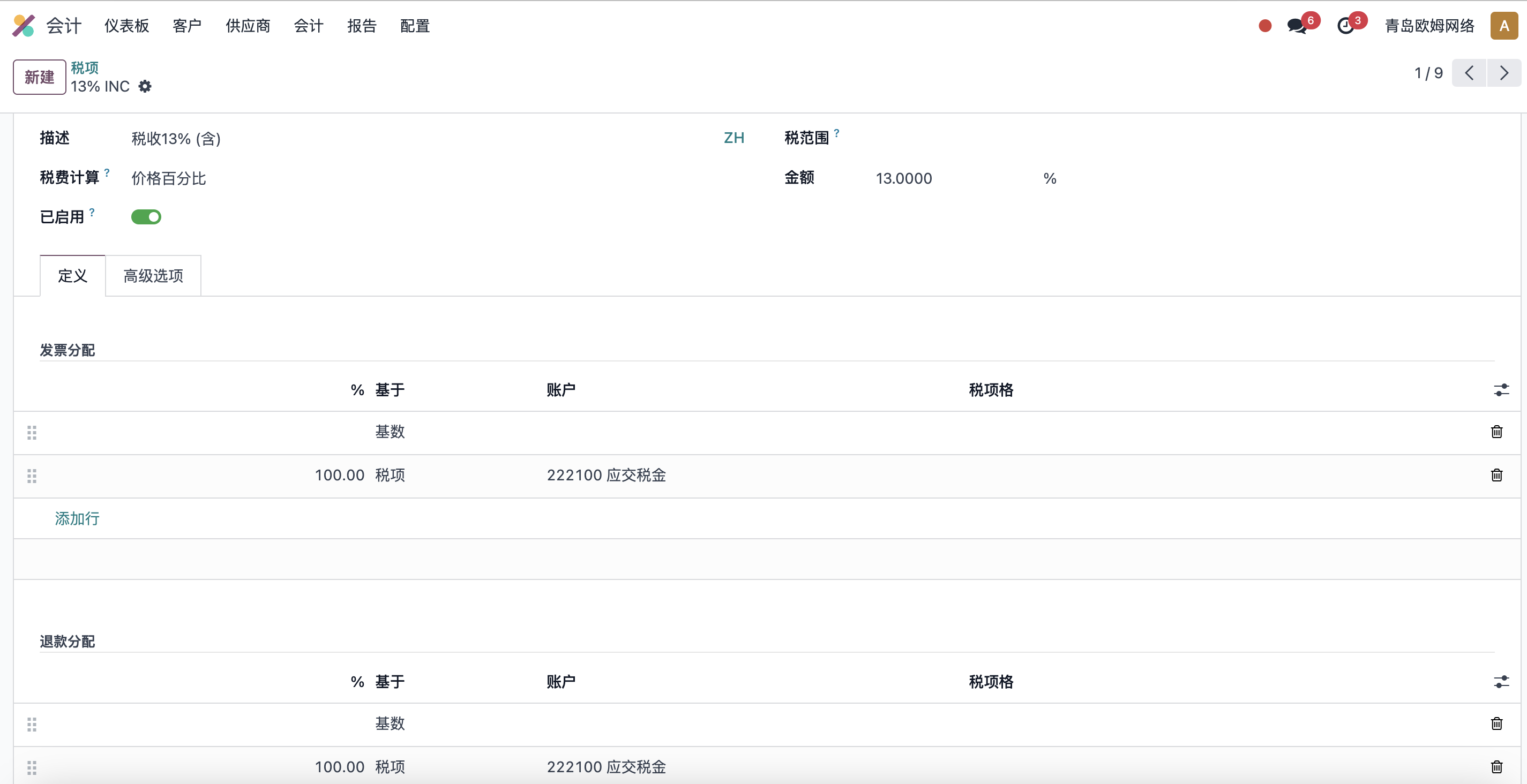
Taxes affect:
- Sales order tax amount.
- Customer invoice tax amount.
- Journal entries.
- Tax reports.
- Tax-included or tax-excluded display.
If the company installed a localization package, Odoo creates many common taxes automatically. Do not delete native taxes casually. Archive or create new taxes when needed.
Product Taxes
Products usually have sales taxes and purchase taxes.
| Field | Purpose |
|---|---|
| Sales Taxes | Used on sales orders and customer invoices |
| Purchase Taxes | Used on purchase orders and vendor bills |
If product taxes are wrong, both quotation and invoice amounts will be wrong. Before products go live, finance should help confirm taxes for key products.
Do not mix sales taxes and purchase taxes. Sales taxes are for customer quotations and invoices. Purchase taxes are for vendor bills. Many companies focus only on sales price during product import and ignore taxes, then discover that invoice taxes need rework later.
For many products, organize taxes by category first:
- Standard tax products.
- Tax-exempt products.
- Export products.
- Service products.
- Special tax products.
When product volume is large, do not check everything manually one by one. Export products, review taxes in bulk, and import corrections.
Fiscal Positions
Fiscal positions map taxes and accounts according to customer, country, or tax identity.
The example below shows a fiscal position. It can map the default taxes on an order to another set of taxes for a particular customer or scenario.
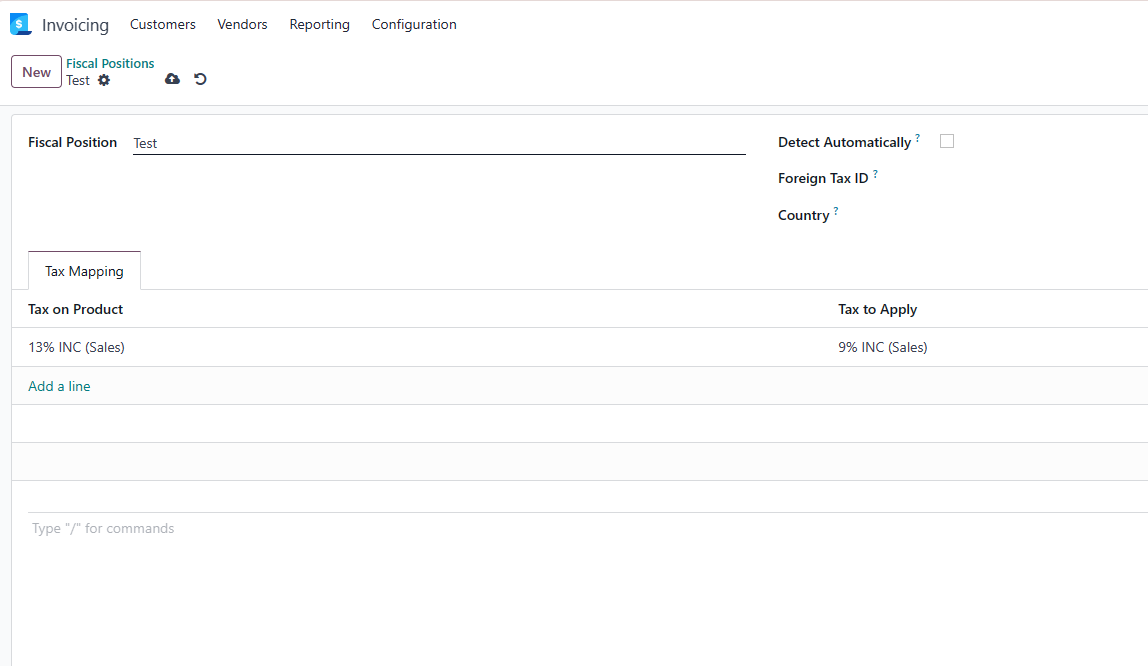
Examples:
- Domestic customers use local standard tax.
- Export customers use 0% tax.
- EU customers follow VAT rules.
- Tax-exempt customers map to exempt taxes.
- Customers in different countries use different accounts.
Fiscal positions can be set on the customer record or matched automatically by rules.
After a fiscal position is selected on the sales order, order line taxes are replaced according to the mapping.
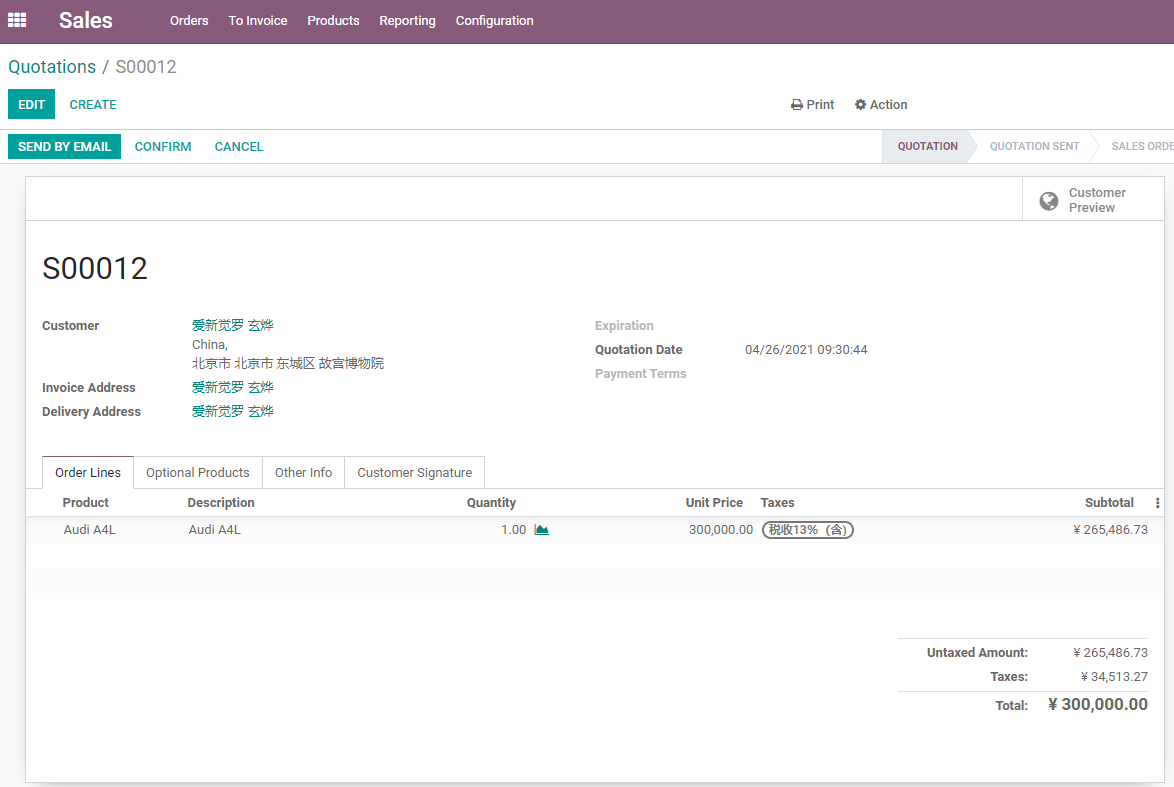
Taxes appear on sales order lines. Salespeople do not need to understand every accounting entry, but they must know that taxes come from products and fiscal positions and should not be manually changed without reason.
What Fiscal Positions Are Good For
Fiscal positions solve the problem: "the same product is sold to different customers, but tax treatment is different."
| Scenario | Example |
|---|---|
| Export sales | Map local standard tax to export 0% tax |
| Cross-region sales | Switch tax by customer country |
| Tax-exempt customer | Map standard tax to exempt tax |
| Special industry | Use special tax for selected products or customers |
| Account mapping | Post revenue or tax to different accounts |
Do not duplicate products for every tax scenario. Prefer fiscal positions to map taxes.
For example, the same product may use standard tax for domestic sales and 0% tax for export sales. The product itself should not be duplicated into "domestic version" and "export version"; use customer or order fiscal position to map the tax.
Fiscal positions can also be combined with customer data. For frequent export customers, set the default fiscal position on the customer. For occasional business, choose the fiscal position manually on the order.
Tax-Included And Tax-Excluded Prices
Sales quotations must make it clear whether the price includes tax.
| Scenario | Common Practice |
|---|---|
| B2B sales | Tax-excluded unit price plus tax amount |
| Retail | Tax-included price |
| Cross-border | Often tax-excluded or 0% tax |
| Stores / POS | Often tax-included price |
Tax-included pricing affects what customers see and how pricelists are designed. Sales and finance must agree on one quotation basis.
A common misunderstanding is: sales says "this product is 100"; finance understands it as 100 before tax; the customer understands it as 100 including tax. The system cannot explain business policy for the team. Align the external quotation basis before go-live.
If multi-currency and pricelists are used, also confirm whether pricelist amounts include tax, whether the sales order PDF clearly displays tax, and whether the invoice matches the quotation.
Taxes And Invoices
Taxes on the sales order flow into the customer invoice. After the invoice is confirmed, accounting impact is generated.
If a confirmed invoice has the wrong tax, correcting only the sales order is not enough. Finance usually needs to follow proper correction rules, credit notes, cancellation, or re-invoicing depending on local compliance requirements.
Before confirming the order and invoice, check:
- Customer tax data is correct.
- Product taxes are correct.
- Fiscal position is correct.
- Tax-included or tax-excluded price basis is correct.
If a tax mistake has already entered a formal invoice, it usually cannot be fixed by simple deletion or direct edit. Finance must decide whether to reverse, reissue, cancel, or create a credit note according to local rules. This is why tax review at sales order stage matters.
Implementation Advice
Recommended sales tax implementation sequence:
| Phase | Recommendation |
|---|---|
| Phase 1 | Use taxes created by the localization package; do not delete them casually |
| Phase 2 | Let finance confirm product sales and purchase taxes |
| Phase 3 | Design fiscal positions for export, exemption, and cross-region customers |
| Phase 4 | Test quotation, invoice, tax amount, and tax reports together |
| Phase 5 | Evaluate special taxes such as excise duty, environmental tax, or alcohol tax separately |
This chapter explained the relationship between sales taxes, product taxes, fiscal positions, and tax-included pricing. The next chapter explains sales and inventory delivery, including how sales order confirmation affects stock, delivery, and invoiceable quantities.